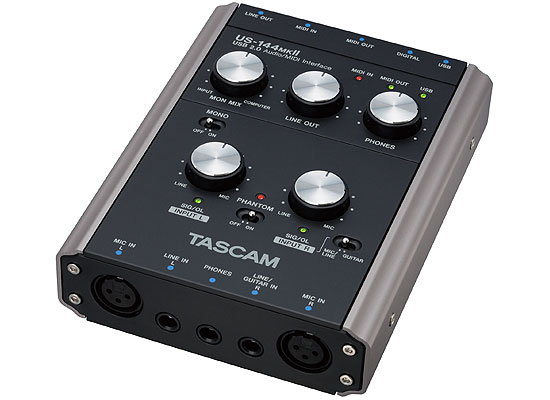
The TASCAM US-144 mkII's Phantom Power gets very noisy when the temperature drops below 65
To track down the source, I started by changing out the AC power for battery power, switching USB cords, switching mic cords, switching microphones, switching interfaces, turning on and off the wireless network, unplugging my wireless router, changing rooms, and even moving to a location several miles away. None of these things had any consistent effect on the whine. After a lot of trial and error, I have narrowed the problem down to two three variables: Temperature, Phantom Power and the MIC/LINE-GUITAR select switch.
The whine appears with the phantom power on, while the interface is cold (ie, less than about 65 degrees Fahrenheit). It gets worse when the MIC/LINE-GUITAR select switch is set to “Guitar.” Setting the MIC/LINE-GUITAR select switch to “Guitar” makes it act as an unbalanced input jack, which probably explains the noise. But turning on the phantom power while the interface is cold produces a lot of noise.
The solution: Sit on the interface to warm it up. My home “studio” is in a very cold room with two exterior walls, and it’s the middle of winter. So in order to warm up the interface—no joke—I actually put it under my thigh for a good 10-15 minutes. I didn’t read that helpful work-around in the manual. I thought about using an electric blanket, but I was afraid that might cause some induction damage.
The Test
I conducted a test to demonstrate the whine, which I have included here. For the test I had the following setup: I plugged an Audio-Technica AT 2020 condenser mic into the MIC IN L XLR balanced jack. I also plugged a crappy old dynamic mic into the LINE IN R/GUITAR IN jack TRS 1/4″ jack. For the “Cold” test, I left the interface in a box in my car for 30 minutes, where the outside temperature is around 25° Fahrenheit. For the “Warm” test, I basically sat on the interface for about 15 minutes until the interface housing was noticeably warmer than room temperature.
I then recorded a systematic test of the phantom power, left and right input levels, and the MIC/LINE-GUITAR select switch in 10-second intervals. I included the results in a table below, with each numbered setting corresponding to a period of time on the non-normalized .mp3 file. You can skip around to compare the different settings if you’d like. Please ignore the ambient noise of the HVAC system, as well as the lousy line quality for my crappy dynamic mic.
| Setting | Time on Tape | Phantom Power | INPUT L Levels (AT 2020) |
INPUT R Levels (Crappy Dynamic) |
LINE/MIC- GUITAR Select Switch |
Whine |
| 1 | 0:00-0:10 | OFF | Line (Low) | Line (Low) | Line/Mic | None |
| 2 | 0:10-0:20 | Mic (High) | Line/Mic | None | ||
| 3 | 0:20-0:30 | Line | Guitar | None | ||
| 4 | 0:30-0:40 | Mic | Guitar | None | ||
| 5 | 0:40-0:50 | Mic (High) | Line | Line/Mic | Scratch | |
| 6 | 0:50-1:00 | Mic | Line/Mic | Scratch | ||
| 7 | 1:00-1:10 | Line | Guitar | Scratch | ||
| 8 | 1:10-1:20 | Mic | Guitar | Scratch | ||
| 9 | 1:20-1:30 | ON | Line | Line | Line/Mic | Whine-Low |
| 10 | 1:30-1:40 | Mic | Line/Mic | Whine-Med | ||
| 11 | 1:40-1:50 | Line | Guitar | Whine-Med | ||
| 12 | 1:50-2:00 | Mic | Guitar | Whine-Scream | ||
| 13 | 2:00-2:10 | Mic | Line | Line/Mic | Whine-Loud | |
| 14 | 2:10-2:20 | Mic | Line/Mic | Whine-Loud | ||
| 15 | 2:20-2:30 | Line | Guitar | Whine-Loud | ||
| 16 | 2:30-2:40 | Mic | Guitar | Whine-Scream | ||
| Setting | Time on Tape | Phantom Power | INPUT L Levels (AT 2020) |
INPUT R Levels (Crappy Dynamic) |
LINE/MIC- GUITAR Select Switch |
Whine |
| 1 | 2:40-2:50 | OFF | Line (Low) | Line (Low) | Line/Mic | None |
| 2 | 2:50-3:00 | Mic (High) | Line/Mic | None | ||
| 3 | 3:00-3:10 | Line | Guitar | None | ||
| 4 | 3:10-3:20 | Mic | Guitar | Scratch | ||
| 5 | 3:20-3:30 | Mic (High) | Line | Line/Mic | Scratch | |
| 6 | 3:30-3:40 | Mic | Line/Mic | Scratch | ||
| 7 | 3:40-3:50 | Line | Guitar | Scratch | ||
| 8 | 3:50-4:00 | Mic | Guitar | Scratch | ||
| 9 | 4:00-4:10 | ON | Line | Line | Line/Mic | None |
| 10 | 4:10-4:20 | Mic | Line/Mic | None | ||
| 11 | 4:20-4:30 | Line | Guitar | None | ||
| 12 | 4:30-4:40 | Mic | Guitar | Whine-Loud | ||
| 13 | 4:40-4:50 | Mic | Line | Line/Mic | None | |
| 14 | 4:50-5:00 | Mic | Line/Mic | None | ||
| 15 | 5:00-5:10 | Line | Guitar | None | ||
| 16 | 5:10-5:20 | Mic | Guitar | Whine-Loud | ||
My home studio is in the basement near an outside wall, so it’s usually around 65°. Every morning the whine reappears until I physically warm the unit to around 75°+.
At lower temps, the phantom power whines and bleeds over into the 1/4″ inputs, which surprises me because most electronics are happier when they’re cold. I’d chalk it up to a defective unit, except that I purchased two 144 mkII’s, and both units display the same behavior. Regardless, I’m not looking forward to the hassle of returning or exchanging the interface. It’s going to put me back several weeks.
I wonder if anyone else has experienced these same problems. The helpful guys at Sweetwater didn’t seem to have bumped into the problem before.
[Update Jan 14, 2010]
I have decided to return the mkII’s to Sweetwater in favor of another brand, perhaps an M-Audio. I haven’t decided. At first I was content to swap them out for non-defective mkIIs, but apparently TASCAM has temporarily stopped shipping the US-144 mkII. More precisely, they are taking orders without providing a firm ETA. This is apparently quite unusual, and in the estimation of the guy I talked to it likely indicates that they are doing some re-tooling.
I decided that I’m probably better off not being the guinea pig for the “fixed” version (if, in fact they are re-tooling). And even if they’re not re-tooling, I don’t want to wait indefinitely for TASCAM to fill the order.
I am so glad that I purchased from Sweetwater instead of Guitar Center. Sweetwater has much better support. Let me correct that: Sweetwater offers any type of support.
[Update Jan 25, 2010]
I decided to go with a Lexicon Omega instead. So far (in some preliminary recordings) I haven’t had any noise problems, thought the levels are significantly lower than the Tascam 144 mkII. I’ll just have to do more post-normalization. I hope the noise levels stay tolerable.
#1 by Brad on January 11, 2010 - 8:07 pm
Great write up. I’m considering the Tascam 144 for recording vinyl to my pc, temperature jankeyness notwithstanding, would you recommend this piece of hardware? Thanks.
#2 by Titus on January 11, 2010 - 9:01 pm
The TASCAM 144 (original) is great… I never had any problems with it. Even the mkII is a great piece of hardware, if I didn’t have to warm it up every time I wanted to use it. I’m still deciding whether the hassle of warming it up is more or less than the hassle of getting a new unit, installing new software, and starting over.
#3 by Brad on January 12, 2010 - 3:43 pm
Thanks for the reply. If i end up going with the Tascam, I’ll let you know how it goes.
#4 by Benjamin on January 14, 2010 - 4:53 am
The symptoms you describe are typical of a faulty electronic component. Get it changed before it dies totally (and your guarantee expires!)
I had one where, when switched to Guitar (and only when switched to Guitar), the input would click when the green Signal lamp switched on and off.
I have read of people having several unrelated problems with the Mk2. I wonder if the quality control has slipped?
#5 by Benjamin on January 15, 2010 - 12:31 am
On closer listening, I notice your 144 mk2 also has the right channel Guitar setting click problem!
Listen at 1:10[s8], 3:10[s4] and 3:50[s8] (they are all right channel, set to Guitar.) You can clearly hear clicks.
I bet this is happening as your voice switches the green SIG light on and off, right?
Drat. I was hoping mine was just faulty. I was going to order another one, but if yours also has this problem, then obviously they all do this.
Mine was serial number 0040815 by the way.
#6 by Titus on January 15, 2010 - 6:48 am
Benjamin,
You know, I hadn’t noticed whether the clicks are associated with the SIG light turning on and off. You’re probably right. Do you also have the whine problem?
And since you mention it, my serial numbers were: 0021661 and 0012254.
#7 by Benjamin on January 15, 2010 - 9:33 am
No whine problem, nor the “frying” sound you have. Apart from the Guitar-green lamp click phenomenon, mine was very very silent. I have three Edirol interfaces and Tascam’s 1641, and they are silent, too, so I do have a reference. I used a Shure SM58 at the dead of night with AKG headphones.
So did you have TWO with this whine/fizzing? Because that indicates a failing component, and to have it twice is unfortunate indeed! Your serial numbers are earlier than mine, but still fairly far apart.
My (old-school) boss taught me a trick: forget fault-finding with oscilloscopes and signal generators. Just put on headphones, then touch each component with ice bundled in a sealed bag. Hear a change? That’s your faulty component!
I’m almost certain the click is a design fault. A pity, because there’s nothing else in that price range that does 96k. And I prefer the layout to having knobs in front for desktop work.
#8 by Benjamin on January 15, 2010 - 9:42 am
…ah, you say you had the old 144, without problems. Also no click?
Perhaps I’ll go that route. The preamps are supposed to be better in the Mk2, but by how much? The gain isn’t that great either, and I use a Shure SM7, which needs quite some gain.
#9 by Titus on January 15, 2010 - 9:43 am
I also wish there were something comparable in design and price, but there really isn’t. I’m going to return the two units in favor of a Lexicon Omega. I’m with you- I also prefer the knobs on the front for desktop recording; I’m not as excited about the Omega interface, but if it works, I’m game.
The ice-bag trick is genius! I didn’t pop open the units, primarily because I didn’t want to void any warranty. But I’ll remember it for the future.
#10 by Titus on January 15, 2010 - 9:45 am
I used the 144 without any problems, but it was also in an environment that never got cold. I’m choosing not to go with the 144 because they don’t have driver support for Win 7. I have one machine running win 7 64 bit, and getting something to work on that machine is another hassle altogether.
#11 by Benjamin on January 15, 2010 - 10:30 am
No Win7 drivers – you’re right! Wheras the mk2 versions all have Win7 drivers online. Cheek.
I see a new US-800 has been announced. No details yet. But not as portable.
#12 by Benjamin on January 15, 2010 - 10:33 am
no, wait, I tell a lie. The DO have Win7 for the Mk1; also 64-bit.
http://www.tascam.com/details;9,15,70,19.html
OK, I know what I’m gonna do.
#13 by mike on January 27, 2010 - 6:59 pm
Exact same problem here that renders the device useless for me, since I use it for guitar amp modeling (guitar rig 4). The clicks and pops are very bad by themselves, but when you use a hi gain amp with distortion or overdrive the slight clicks and pops become a huge issue. I can see in various forums that many people have the same issues. In the official forum TASCAM pretends nothing is wrong, so no solution.
STAY AWAY FROM IT! BUY SOMETHING ELSE!!!
#14 by me109 on March 24, 2010 - 9:38 am
In spite of everything, and due to my budget, I just ordered one. I can’t imagine the hassle of sitting on it with wires connected and all, but then I remembered the coffee cup warmer my wife bought that was never hot enough to keep the coffee warm. It at least ought to be able to keep the MkII above 65 degrees! My Lexicon Alpha was just too slow and noisy to stand anymore.
#15 by Jan Jacobs on March 29, 2010 - 2:11 pm
If you’re looking for a music store with REALLY GOOD customer service, try N’Stuff Music. I buy all my gear there, and the guys are very helpful and knowledgeable. Plus, they’re a family-owned local business, not a giant like sweetwater & guitar center.
#16 by hassle on April 26, 2010 - 9:32 pm
I just ordered one. I can’t imagine the hassle of sitting on it with wires connected and all, but then I remembered the coffee cup warmer my wife bought that was never hot enough to keep the coffee warm. It at least ought to be able to keep.
#17 by Z. on May 5, 2010 - 7:03 pm
I have the exact same problem that Benjamin had, however, MY US-144 is NOT under warranty ><
#18 by Andreas on January 1, 2011 - 5:51 am
I have been struggling with what sounds like the same problem. Through elimination of plugs, cables leads, ports etc I tried to find the culprit but to no avail, until I unplugged the power supply lead to the laptop driving my system. Silence, absolute, beautiful silence! because my laptop is a couple of years old and the battery is not capable of delivering a few minutes of power at most, it runs on mains constantly. I tried a number of different power supplies with the exact same result. Moving the power supply away from the computer did not help either. So, while I haven’t been able to find a hundred good suggestions on the net to solve the problem, I’d be interested to hear what other users have to say to this. As a matter of interest, I also tried my rig on a fairly decent desktop with reduced but similar noises. I’ll be watching this space for comments.
#19 by Gabex on January 12, 2011 - 10:49 am
Dear Aaron,
The problem you describe is called capacitively coupled switching noise. The problem lies in the fact that the TASCAM is powered with 5V and it needs to create 48V for the phantom power somehow. The engineers included a step-up converter in the unit for this function and that is a so called switching mode boost converter. It has an inherent electromagnetically radiated noise and that can be picked up by other part of the circuitry. In the unit, the most susceptive part is the input. Since it is located close to this converter, the noise is injected capacitively – hokuspokus – and the noise level is depending on the input impedance of the input amplifier stage. In guitar mode it’s the highest (500 times higher than in mic mode), that’s why it’s the loudest there. Why the warming up helps, I don’t know. It is almost impossible to help it (with shielding) without opening the unit either, because it is coupled inside the unit.
I hope my assumption is right, but I’m sorry that I can’t give any solution.
Best regards, Gabor Nagy
#20 by Carlo Mario on September 20, 2011 - 3:03 pm
HI there! I got this unit last year, good working condition, but did not use it for a long time, so I decided to use it again to check if it was still OK. Plugged it in a desktop computer before, but this time I used my cousin’s HP Pavilion dm4 series laptop… So everything was fine until I decided to plug a cardioid condenser mike to the unit (phantom power needed here) and turned the phantom power switch ON. Started talking on the mike, but volume decreased as I talked, and it added some noise similar to what I’ve heard on the MP3s you posted here. Then I searched on the net and came across your article, but it probably was not the problem. I am a computer technician too, and experience told me that recent laptops do not provide a good power supply inside, so I tried my beloved apparatus on a friend’s desktop PC again and guess what… It works like a charm! Mike worked fine, no problems at all. Note that I used the laptop with both battery and AC power, so maybe a laptop is not suitable for using this usb interface. Another idea that came to my mind is using a dual-powered USB cable in order to make it work with the laptop, but I don’t want to risk my unit as it may malfunction or definitely die. My 2 cents =)
#21 by Carlo Mario on November 22, 2011 - 7:03 pm
Hi again! I recently purchased a powered USB hub so I could fix the problem with the US-144mkII using the same laptop mentioned on the post before this one. THE UNIT WORKS GREAT! I suppose that the Tascam interface is not 64-bit friendly… For some reason it needs more energy, maybe to handle more data? Or was it the laptop’s PSU? No idea. But my problem was finally solved. Hope it works for you guys.
#22 by James on January 10, 2012 - 2:01 pm
I have the mkii and am struggling with this clicking. I have also noticed it is being influenced by the sig/ol L.E.D. while in guitar mode. Is there a way to fix it? My product is no longer in warranty so I am willing to open it.
#23 by LP-filter on January 17, 2012 - 9:13 am
Hi!
I ‘m interested to the noise problems are solved meantime from 2010 with a firmware upgrade, or talking from construction error?
Thanx!
#24 by Richard on February 18, 2012 - 5:18 am
I have a 144 Mk1 (actually two of them)
It has been an absolutely brilliant asset for several years and I’ll say the following:
To the person who bought a MK2 anyway, because that was what he could afford: you should have gone to ebay and got yourself a mk1. It sounds like Tascam have made a screwup with the mk2 and I really hope they do the right thing by their customers.
To people who have experienced whining
: I found I had a whining problem when I had my 144 linked to other gear: I was using the 144 as a mic pre into a USB-connected desk, so there was a ground-loop problem. The noise was due to my laptop screen : these have a chopper circuit to modulate the backlight brightness. Turn it up to full brightness and the whine goes away. Better still, if you I’d used proper balanced interconnects it shouldn’t have been a problem- but my solution on the day was to go with the cables I had available and to turn the screen up full.
The 144 phantom generator circuit is not noisy.
(Your whine could be from many other sources, your laptop backlight may work differently from mine, your mileage may vary.)
HTH.
Rich.
#25 by Vlad on November 23, 2012 - 3:38 am
Hello. I’ve bought 144 mkII recently and connect it to desktop with Windows 7 Home Prem 64 bit. (Intel i3, 8Gb RAM). After recording i’ve found random clicks. I’m very sad. Then I switch off microphone at all (Mon MIX -> computer), turn off Phantom power, and try to record only silence. But in this case clics still persist! Have someone same problem? How can I eliminate this clicks?
#26 by Carlo Mario on November 23, 2012 - 2:32 pm
Hey people! Make sure you use the 64-bit drivers for the 144mkII on a 64-bit OS (it can handle 32-bit drivers too but it will be a mess in this case), otherwise you will hear clicks on the audio. Updating the firmware is also recommended, look for them on the TASCAM support. If you have other sound problems, remember to use a usb-powered hub, or a shorter, high quality usb cable.
#27 by Dave on March 14, 2013 - 1:18 am
I played your test sound file, and thought, “Wow, those are the same background noises I’m getting!” I am using a 144 mkII with the newest firmware & drivers, into a MacBook Air OsX 10.7 Lion, drawing power either from power-supply or battery. I’ve noticed some sort of antenna-like noise-dampening effect if I touch the outside of the unit, including the metal jack of the guitar cable, so maybe I have a funky grounding issue?? The noise is not nearly as bad a problem with a dynamic mic –> XLR input.
For what it’s worth, I’ve noticed a HUGE noise reduction if I avoid the tascam’s line/guitar input altogether, and instead use the Tascam’s S/PDIF (digital) input, fed from my old Johnson J-station guitar effects unit:
guitar –> j-Station –> jS’s S/PDIF out –> Tascam’s SPDIF in.
I’ve just started to noodle around with it.. If I learn anything helpful, I’ll make a follow-up post.
I’ve had some good moments here-and-there. I’ve successfully recorded tracks via Reaper, run thru effects via Guitar Rig software, and output the signal to a guitar amp, so I’m making some progress..
#28 by Pooleside on May 24, 2013 - 8:03 pm
Great post Titus, thanks.
I got one of these US-144MKII’s to get “into the box”, having used a stand-alone recorder for years. I specifically needed the spdif ins and outs to connect to my old workstation.
That part works just fine, but the need arose to plug in some mics and that’s when the old whine popped up. I noticed right away it was related to phantom power, and I suspect the step-up converter as mentioned by Gabex.
My whine only occurs in the right channel however. There is a lot of white noise in both channels with the pre’s up full, but the unit isn’t spec’d too highly in that department anyway. No, this whine makes the right channel unusable for a lot of what I do, and particularly for the orchestral recording I’ve got coming up.
I tried a number of different mics, and have really only noticed this on an AT 825 stereo mic. The difference between this mic and an AT 4041 (other than the fact that the 4041 is mono) is that the output impedance is 200 ohms, rather than 100 ohms for the 4041.
Following through with the idea that it was mic impedance related, I tried the other condensers in my cupboard. I found no consistent relation between mic impedance and whine. The only other mic to produce it was an elderly EV RE1000, rated at 250 ohms. Other mics in the 200 ohm range did not produce the whine, or only faintly, and none rated at 100 ohms.
Here’s what I tried-
AT-4033- no whine
EV-RE1000- whine
M-Audio Solaris- no whine
Crown CM-700- no whine
EV RE200- no whine
AKG C2000B- no whine
Rode NT1-A- no whine
AT 825- whine
AKG Perception 420- faint whine
MiLab DC 96b- faint whine
AKG C3000- faint whine
Finally, I installed an AA battery in the 825 to eliminate the need for externally supplied phantom power. Result- no whine.